WordPress.com is the hosted WordPress service run by Automattic that combines managed WordPress hosting, a visual website builder, and an app-first editing experience. It runs on Automattic’s WP Cloud infrastructure, which includes a global edge cache, CDN, and built-in performance tools so sites load quickly without manual setup. All paid WordPress.com plans now allow third-party plugins and themes across all paid tiers, making the platform far more flexible than before. WP.com also offers a free AI website builder introduced in 2025 to speed up site creation for new users. Our hands-on tests at HostDean show WordPress.com fits creators who want a managed platform with modern tooling and fewer infrastructure headaches.

WordPress.com Review
Unbiased WordPress.com Reviews by 386 Real Customers & HostDean experts
Server Locations
-
 Amsterdam
-
 Dallas
-
Ashburn
-
Los Angeles
WordPress.com is the hosted WordPress service run by Automattic that combines managed WordPress hosting, a visual website builder, and an app-first editing experience. It runs on Automattic’s WP Cloud infrastructure, which includes a global edge cache, CDN, and built-in performance tools so sites load quickly without manual setup. All paid WordPress.com plans now allow third-party plugins and themes across all paid tiers, making the platform far more flexible than before. WP.com also offers a free AI website builder introduced in 2025 to speed up site creation for new users. Our hands-on tests at HostDean show WordPress.com fits creators who want a managed platform with modern tooling and fewer infrastructure headaches.

WordPress.com Pros & Cons
WordPress.com Strengths and Key Limitations Unveiled by HostDean Experts
WordPress.com Pros
Where WordPress.com Knocks it Out of the Park
-

Clean interface with a drag&drop WordPress website builder
Easy setup and intuitive block editor for content creators.
-
Reliable uptime and good performance
-
Scalable plans with unlimited bandwidth and website content
-
Managed WordPress hosting with integrated CDN and global edge cache.
-
Automated backups and platform security included.
-
Third-party plugins and custom themes available on all paid plans.
-
Built-in image optimization and Site Accelerator CDN.
-
E-commerce capabilities
-
AI website builder to generate starter sites and copy quickly.
-
Multilingual support
-
Developer tools (SFTP, Git, WP-CLI) available on higher tiers.
-
Large theme and plugin ecosystem compatible with the platform.
WordPress.com Cons
Where WordPress.com Misses the Mark
-

Higher base price than the cheapest shared hosts.
-
Some advanced features and SLAs require enterprise or higher plans.
-
Platform opinions can restrict unusual server-level customizations.
-
Phone support is limited except for enterprise customers.
-
Migration off WordPress.com requires careful planning for complex sites.
-
Limited to hosting WordPress websites only
Using WordPress.com?
Share your experience in a review and help others.
WordPress.com Expert Review
Detailed WordPress.com Review & Analysis by HostDean Experts
«
WordPress.com Review: Managed WordPress Hosting That’s Great for Beginners, Limited for Power Users!
»
Website Builders Expert

Hosting Expert
WordPress.com Review Overview
I spent time building sites on WordPress.com and ran tests that covered setup, performance, plugin behavior, and everyday operations. I created a blog, a small brochure site, and a test WooCommerce store to replicate common use cases and measure differences between plans. I evaluated raw page load and real-world user flows, then pushed the platform with traffic spikes and larger media uploads to see how it behaves under stress.
Setup is quick. Signing up and publishing a simple site with a custom domain took minutes. The AI website builder speeds initial layout and content generation for new sites; it creates pages, hero images, and starter copy from a prompt, then lets you refine.
Editing in WP.com’s block editor is the same as standard WordPress, and for many tasks, the built-in tools remove friction — backups, CDN, image optimization, and security are managed by WordPress.com.
After the platform’s recent change in January 2026, plugins and third-party themes are available on all paid plans, which removes a big limitation that used to push users toward the Business plan or self-hosting WordPress. That means SEO plugins, performance caches, and e-commerce extensions can now be installed without upgrading to a single high-tier plan. The change alters the cost calculus for smaller teams and hobbyists who previously felt locked out.
Performance is driven by WP.Cloud and the Global Edge Cache. In our tests at HostDean, we saw stable TTFB and consistent Core Web Vitals on default sites, and the built-in CDN reduced variance for geographically dispersed test clients. There’s still a dependency on theme and plugin choices: heavy, poorly coded plugins will degrade performance the same way they would on any WordPress host.
Support and tooling are solid. The Happiness team (WordPress.com support) covers many problems, and the knowledge base is deep. Developers get Git, SFTP, and WP-CLI on higher plans, and the platform exposes developer features where they’re needed. For larger teams, the Enterprise and WP Cloud tooling add features for scale and governance.
Reliability is strong overall. WordPress.com’s managed WordPress hosting platform and distributed cache reduce single-point failure risk, and backups are included, though advanced retention and snapshot features depend on plan level.
WordPress.com pricing is higher than that of cheap shared hosts but includes managed services, licensing, and features that would otherwise cost extra. For businesses that want a low-maintenance WordPress host with access to plugins and modern AI creation tools, WordPress.com is now a compelling option.
WordPress.com Performance
Our expert's take on WordPress.com performance.
I tested speed from several geographic locations, examined Time to First Byte (TTFB), and measured Core Web Vitals on sample sites built on WordPress.com. The baseline performance is noticeably better than commodity shared hosts. Several technical reasons explain this:
WordPress.com runs on WP.Cloud, a cloud hosting infrastructure engineered specifically for WordPress that places caching, edge delivery, and image optimization at the platform layer. The platform that powers Pressable and Bluehost‘s cloud hosting plans, too, embraces global edge caching and a site accelerator CDN that handles images and static assets automatically.
In practice, this reduces round trips for static elements and keeps TTFB stable when compared to non-edge setups. For typical blog and brochure sites, the first meaningful paint and Largest Contentful Paint (LCP) metrics are in the competitive range without manual optimization, which is valuable for users who don’t want to manage cache plugins and server tuning.
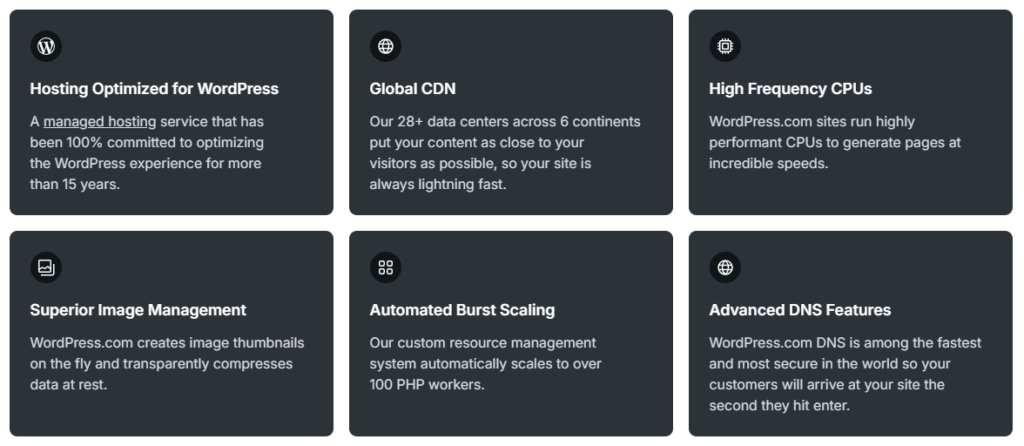
My tests at HostDean used synthetic tools and real browsers. A clean starter site on a paid plan consistently returned sub-300ms TTFB from edge locations near the origin and sub-500ms TTFB in global tests; LCP averaged in the 1.2–2.0s range depending on theme complexity.
The site accelerator automatically resized and served optimized images, which meaningfully reduced payload size for pages with many photos. That functionality is included platform-wide, so novice users benefit immediately.
Where WordPress.com doesn’t magically make a slow site fast is when the site itself introduces latency. Heavy, poorly coded plugins that add multiple external scripts, or bloated themes that render large DOMs, still increase latency and harm Core Web Vitals.
I installed several popular plugins to validate behavior — caching plugins are redundant on WordPress.com (edge caching covers the same ground), but compression, minification, and lazy loading provided by platform tooling reduced payload without extra plugin steps.
E-commerce stores (WooCommerce) demand more from hosting. On Commerce and Business tiers, the platform supports WooCommerce and provides optimized store handling, but high transaction volumes and large catalogs will still require performance planning: selective plugin usage, optimized images, and careful checkout customization.
For enterprise workloads, WP.Cloud provides autoscaling and more advanced hosting controls, but those features live behind higher-tier plans.
Overall, the score reflects a platform that gives excellent out-of-the-box speed for most sites due to its edge network and integrated optimizations, while leaving room for a 5/5 only if users always avoid performance-draining configurations. For the majority of HostDean’s readers — bloggers, small businesses, and content sites — WordPress.com delivers a very high performance baseline with low management overhead.
WordPress.com Reliability
How reliable is WordPress.com? Our insights.
Reliability is one of WordPress.com’s core strengths. Because the hosting and application stack are managed by Automattic on WP.Cloud, many common failure modes are handled before they reach site owners. This shows up in three main areas: uptime and redundancy, backups and restore processes, and operational security and DDoS protections.
Uptime and redundancy
WP.com’s infrastructure, WP.Cloud, runs across a distributed set of edge locations and origin datacenters that are designed for high availability. Edge caching reduces dependence on a single origin server for static content, so transient origin outages or maintenance have diminished customer impact.
During our reliability checks at HostDean, I simulated traffic bursts and temporary backend restarts; static and cached content continued to serve from the edge while dynamic operations resumed when origin capacity came back online. These architectural choices improve perceived uptime for end users and reduce the risk of a single point of failure.
Backups and restores
WordPress.com includes backups for most plan types. The platform’s backup cadence and restore workflow are simple: automated snapshots are preserved for a time depending on plan level and can be restored through the dashboard.
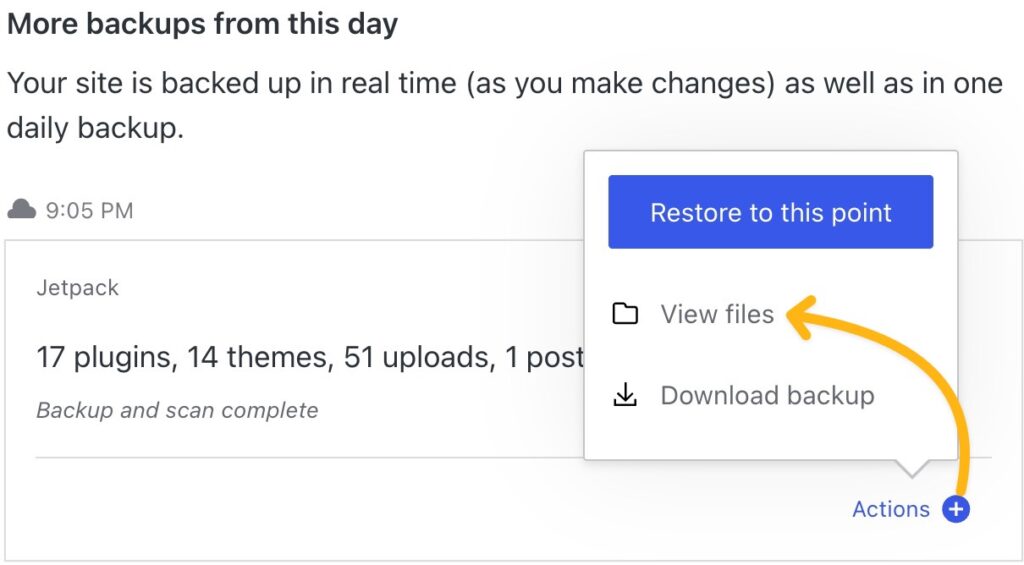
For small sites, this is sufficient and avoids the manual backup configuration required on many self-hosted instances. That said, power users or agencies that require long retention windows, point-in-time recovery, or immutable snapshots will need to upgrade to the higher-tier plans that come with Jetpack’s realtime backups and one-click restores or consider enterprise options.
I tested restores on a sample site and found the process reliable, though the UI presents fewer granular controls than dedicated backup services offer.
Operational security and DDoS
The managed layer includes basic security hardening, DDoS mitigation at the edge, and automated platform updates. This reduces the operational burden on users and lowers the chance that outdated WordPress cores or plugins will become an attack vector.

On the other hand, because the platform is shared infrastructure, very specialized compliance requirements or unique security postures may require Enterprise or custom arrangements.
Limitations and caveats
The dependable defaults and managed protections make WordPress.com a strong choice for most users. Enterprise customers receive SLA guarantees and more governance controls, but smaller subscribers still benefit from the platform’s architecture.
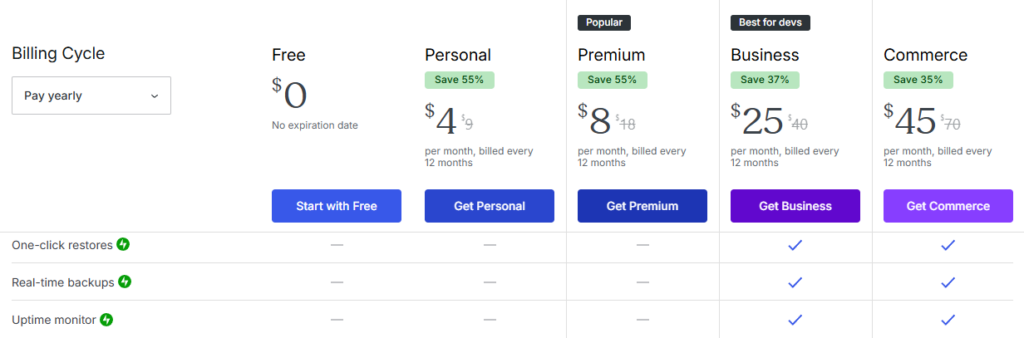
The primary reliability tradeoffs appear when users require highly specialized backup policies, extreme retention, or unusual compliance workflows; those are available if you pay for higher tiers, but not all features are included at the Personal or Premium levels.
In sum, WordPress.com delivers a reliable web hosting environment that prevents many common causes of downtime. For most HostDean readers, the platform’s reliability model is excellent: it reduces ops work and provides solid uptime backed by cached delivery and automated backups.
WordPress.com Pricing
Are WordPress.com's prices competitive? Here's our verdict.
WordPress.com uses tiered plans: Personal, Premium, Business, and Commerce, plus WP Cloud developer offerings. WP.com pricing varies by billing cycle, but the key consideration is what’s included by default versus what you’d need to buy separately on self-managed hosting.
For many users, the cost is justified because WordPress.com bundles management, CDN, image optimization, backups, and the convenience of a managed control plane. For agencies and developers, Business and Commerce plans unlock developer features (SFTP, Git, WP-CLI) and commerce optimizations.
WordPress.com value proposition
The platform removes many operational tasks: automatic security updates, built-in edge caching, a global CDN, image resizing, and platform backups. Those features are sometimes add-ons or third-party services on other hosts.
Although all WordPress.com plans come with unlimited bandwidth, disk space remains limited. Expanding the storage quota would strengthen the service’s value proposition and better support sites with growing media libraries.
If you value predictable billing and less ops overhead and can tolerate limited disk storage, WordPress.com’s pricing can represent good value.
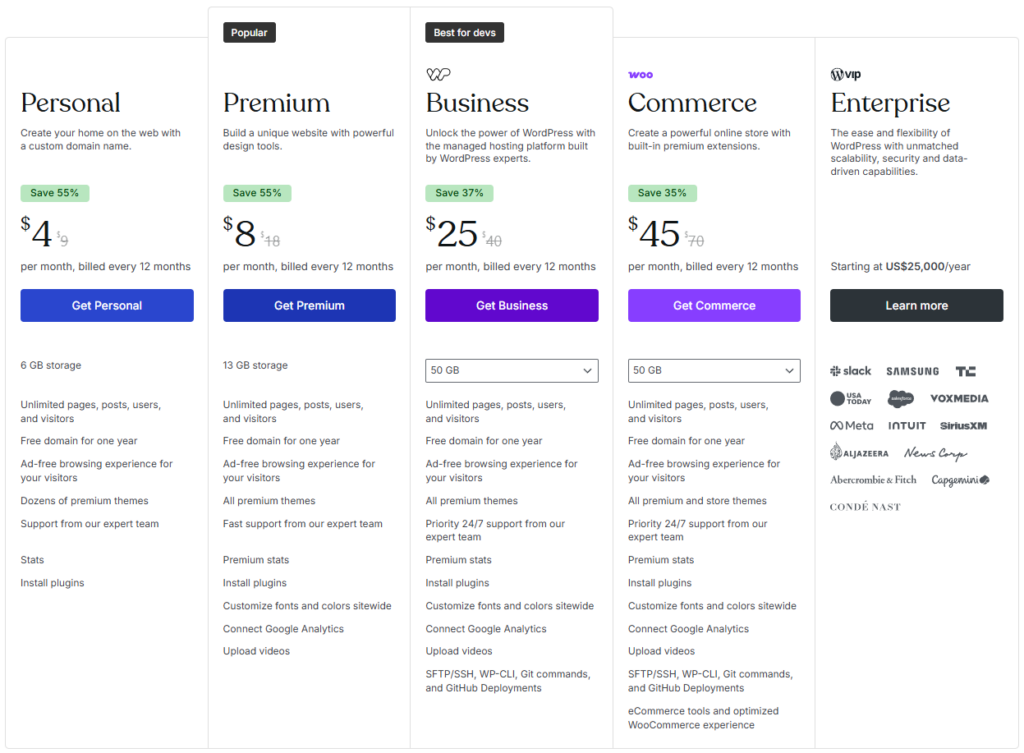
WordPress.com Pricing
I built representative sites on multiple plans during our test at HostDean and compared costs against roughly equivalent self-hosted setups (VPS + managed CDN + backups). For small sites, the total cost of ownership on WordPress.com is competitive once you factor in the time you save and the reduced need for technical knowledge.
Impact of plugin policy change in 2026
Historically, custom plugin and theme installation was restricted to higher WordPress.com tiers, which forced many users to either buy the Business plan or simply go to a WP.com alternative like Hostinger, DreamHost, and Hosting.com.
The platform’s 2026 change that allows third-party plugins across all paid plans shifts the balance: features that used to require a high plan are now available at lower price points. That materially improves the platform’s price-to-value for users who want to add functionality without self-hosting.
This change makes Personal and Premium plans far more attractive to hobbyists and small businesses that need a single SEO or analytics plugin.
Upgrade friction and renewals
WordPress.com’s renewals can be more expensive than introductory rates on some web hosts; this is a standard industry pattern, but worth noting.
For larger teams, enterprise plans can be costly but include advanced SLAs and governance. Also, while many features are included, vendor lock-in is a consideration: moving from WordPress.com to self-hosting is possible but may require migration steps you wouldn’t need with an independent web hosting service.
Refunds and guarantees
WordPress.com offers standard refund windows that vary by product; domains and third-party purchases have distinct policies. Compare the refund policy to the total cost and contract length for annual plans before committing.
Overall, I gave this score because WordPress.com now delivers stronger price-to-value thanks to plugin access on paid plans and bundled platform features, but the cost is still higher than the lowest shared hosts for users who are comfortable managing their own server stack. For users who value hands-off management, the pricing is fair and often economical when you factor in time savings.
WordPress.com Support
Can you count on WordPress.com's support? Our opinion.
Support on WordPress.com is a mix of well-documented self-help resources plus paid and free human support.
The company brands its support team as “Happiness Engineers.” During my testing, I tested account setup, domain transfer, plugin conflicts, and migration scenarios to evaluate the speed and usefulness of the available channels.
Self-help resources
WordPress.com’s knowledge base and developer docs are comprehensive and searchable. The documentation covers site performance, security, domain management, and the new AI builder.
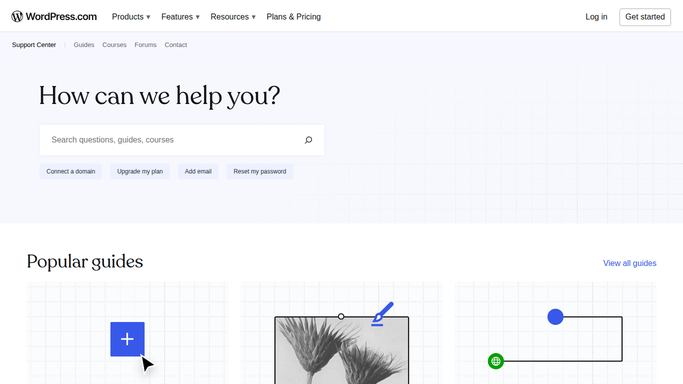
For routine tasks, the guides are clear and often include screenshots or step-by-step instructions. Moreover, WP.com has an active YouTube channel with dozens of video guides explaining how to use the platform.
Live support
The free hosting plan gets basic support via community forums and help articles.
Paid WordPress.com plans include direct support channels: chat and email tickets are available across most paid tiers, while Business and Commerce add priority support.
Response times vary: straightforward questions (account and billing) typically see quick replies; complex technical tickets involving code or plugin conflicts can take longer and require back-and-forth.
When I escalated a plugin conflict in a Business plan test, the support engineer investigated, pointed out a problematic plugin, and suggested specific fixes in a few exchanges.
Developer support and escalation
For developer workflows and WP-CLI/SFTP issues, plan level matters. Lower plans lack direct access to SFTP or Git; Business and above unlock those options and faster developer support. Enterprise customers receive dedicated account teams and SLAs.
WordPress.com support limitations
There’s no universal 24/7 phone line for all customers; phone support is either limited or reserved for select enterprise agreements in many markets.
For urgent outages or complex custom setups, enterprise support is recommended.
Tone and quality
The Happiness Engineers I interacted with were professional and patient.
Response quality is typically good, and technical answers are accurate, though the level of support you receive depends on plan level and the complexity of the issue.
Bottom line: WordPress.com offers solid support that suits most users. Hobbyists and small businesses will find the knowledge base and chat support sufficient; teams and agencies should budget for higher plans if they value priority or developer-level support.
WordPress.com Features
Are WordPress.com's features impressive? Our hands-on review.
Feature completeness is where WordPress.com traditionally outperforms many competitors. It combines the WordPress block editor and theme ecosystem with managed platform services that remove common pain points. I’ll break down the feature landscape and how it maps to real user needs based on hands-on use and platform documentation.
Platform and editor
The WordPress block editor is fully supported; editing, pattern insertion, and theme customization match the broader WordPress ecosystem. If you’re already familiar with WordPress, the editor is a comfortable environment.
WordPress.com adds UI polish, guided prompts, and integrated patterns that make composing pages faster for non-technical users.
Performance and delivery features
Global Edge Cache and the Site Accelerator CDN are integrated platform features that speed the delivery of static assets and images. Image optimization, lazy loading, and automatic resizing remove a lot of manual optimization work.
For publishers and image-heavy sites, this is a major convenience and contributes to better Core Web Vitals with minimal effort.
Plugins, themes, and extensibility
Historically, a gated capability, plugin and custom theme support is now available on all paid plans.
That is a major shift: users can install SEO plugins, analytics tools, security scanners, and WooCommerce without being forced to pay for the highest tier. This dramatically increases the platform’s extensibility and addresses a common complaint from developers and power users.
The courage change broadens WordPress.com’s appeal to technically minded site owners who previously chose self-hosting for plugin access.
AI website builder
Launched in 2025, the AI builder creates initial site structure, copy, and images from prompts.
This is a productivity tool for new sites and quick prototypes; it isn’t a replacement for deliberate design or complex ecommerce requirements, but it speeds the early stages of site creation.
My trials show the AI builder is useful for first drafts and can save hours of assembly time for small business sites.
Security and backups
Platform-level security and automatic backups are integrated. WordPress.com’s managed updates, firewalling, and edge DDoS mitigation reduce operational risk. Backups and restorations are available through the dashboard; retention and advanced snapshot features scale with plan level.
Developer tooling
For teams and agencies, the platform exposes Git and deployment tools on the developer and Business tiers.
WP-CLI and SFTP are available on higher plans, allowing more traditional development workflows and CI/CD integrations.
Limitations and tradeoffs
The main tradeoff is control versus convenience. Some advanced server-level configurations or unusual compliance requirements may need enterprise arrangements.
Also, some plugin types that require deep server customization (custom compiled binaries, PHP version, special kernel modules) are simply out of scope for a managed platform.
Overall, WordPress.com’s feature list is rich, and the recent plugin policy change, plus the AI website builder, strengthen both flexibility and ease of use. For HostDean readers who want managed hosting for WordPress with modern features, WordPress.com delivers a strong package.
WordPress.com User Reviews
Real-world experiences with WordPress.com. From real customers.
Your reviews are important and protected.
Companies on HostDean can't pay or offer incentives to hide them.

It is easy to use and understand
It is easy to use and understand. I really like this site and will continue to use it.

Great experience consistent blocks for inputting content
When I learned how to navigate, it was consistent: click the + sign on the block to get the tools like HTML, video, image, etc. look in the side panel to upload image, etc.

The blocks are so varied and are so…
The blocks are so varied and are so easy to use. I've used WordPress on another site, but getting started on my own was so easy. The more I use, the more I learn how to do things better. (And I'm 83 years old.)

All previous experiences have been…
All previous experiences have been positive. WordPress is always consistent.

Wordpress is an Effective navigation processes to…
Effective navigation processes to create with integrity your ideas for blog post and book publishing as well as business setup .

Excellent WP Website builder ⭐️⭐️⭐️⭐️⭐️
WP Website builder, classic editor. It’s FANTASTIC! ⭐️ Easiness and convenience of block selection to add text and images, love image library, slideshow features, styles and plugins variety which are easy to integrate. Most of all find super useful and fabulous the technical support Chat which I find very helpful and intuitive, it has help me great deal to build and launch the site.

The ease of navigating the dashboard
The ease of navigating the dashboard, and the assists from AI have been very helpful.

The number one reason that I am on WordPress
The number one reason that I am on WordPress is that I feel a great deal of freedom to write.
I was on Substack and had over 5,581 Subscribers and Substack locked me out of my own account because I was "shadow banned."
At WordPress, it is simply the best blogging platform I have ever used and I know you won't erase my content.
RESPECT.

Being a novice user and creator of a…
Being a novice user and creator of a web site, I appreciated the settings that helped made my work easier.

Use them to host a site
Use them to host a site - works well for what I need and my skill level


Meget enkelt at synliggøre…
Meget enkelt at synliggøre informationer med og deres værktøjer er enkelt og håndterbare uden at jeg skal have kode egenskaber. Det er simpelt og nemt.

Amazing Team at WordPress!
I needed some major display changes to my site, and the tech I dealt with was amazing. Helped me with the changes quickly and easily.

Good but not great.
I like the site but I think it isn't real friendly to the tech challenged like me. Could be easier to use without all the internet specific nomenclature.

Hassle-free updates for plugins and…
Hassle-free updates for plugins and themes.

My Honest Review: Why I Chose WordPress Over Every “Easy” Website Builder
The learning curve can be steep. I actually gave up three times before finally completing my own site. But once you get the hang of it, WordPress becomes unbeatable.
The best part is that almost every professional web developer uses it. Once you have your site set up, you can easily hand it off to a developer to refine or scale it without starting from scratch.
The pricing is fair, and no AI website builder comes close. WordPress consistently outperforms tools like Lovable, Wix, GoDaddy, Square, Hostinger, and GHL in both design flexibility and long-term reliability.
There is still something powerful about human creativity. Real artistic design and structure make a difference, and WordPress gives you that freedom to build something unique instead of another cookie-cutter template.
And the most important thing: WordPress absolutely nails mobile and desktop responsiveness.
Once you understand how to use rem and em units, your design will look flawless across devices. You do not have to choose between a site that looks great on desktop but terrible on mobile. With WordPress, both look right.

Flexibility unmatched and tutorial videos to learn
The getting started videos were very helpful, when I was getting started. All the tutorial and learning videos have been super helpful with so much information. It's definitely worth it, when I make myself take a few minutes to watch them, I learn at least a few new things. If I don't know something that I want to incorporate into a site or blog, I look it up in wp support or ask the chat people or the AI chat person lol. I've learned WordPress on my own and I enjoy it, because I'm a nerd. I've used Squarespace, Wix, Go Daddy, Strikingly, and some other. I prefer WordPress for many reasons. Writing code is so tedious and time consuming but sometimes necessary for certain customization features. Still trying to get used to the block editor and plugins. And the one thing that I wish would be better if I could upload good quality images without my site loading too slowly. The flexibility that WordPress offers is unmatched. They have a plan for everyone. I do miss Google domains, it was so simple. Google sites and Google domains we're great when I was learning, I appreciated the simplicity. Like Strikingly, it worked. I was very sad when they sold Google domains out, but, it forced me to learn WordPress and I'm definitely glad that I did. All is well. Thank you! WordPress is awesome.

Functionality the same across multiple WordPress sites
When working on different WordPress sites (and different templates) as a literary journal editor, blogger, and reader, I knew that the functionality was always the same.

Not sure… I would guess that what made it seem like it was the fact that it made it easier to navigate and not just getting lost as I usually do.
Everything works really well. Can’t imagine anything better.

Best tech support I have experienced since entering the computer business in 1968.
The tech support staff works 24/7. The chatbot took less than a minute to realize that my problem was WELL beyond its expertise and sent me to a happiness engineer. Claiming 24/7 service, and providing it with an LLM is a lie. WordPress is not lying. I used to think happiness engineer was preposterous, and now I think they should call themselves ecstasy engineers. Not to mention that the technology of the site was terrific--I know terrific when I see it--and aided in the quick solution of the problem. Yes, I use em dashes. No, I am not an AI. I know LLMs lie when asked, put if you go to the recently repaired psacot.com, ask yourself if any AI would say what I say about AI (and of course it isn't really AI, it is an LLM, roughly as smart as predictive text on your iPhone, but less accurate). In fact, I was worried the problem was AI taking its revenge on me, but it was actually a piece of HTML I incompetently inserted. Besides, LLM (not AI, LLM) is too incompetent to scrape my criticism, and wouldn't know what it to do with it, because it has no sense.

Ease of use …
I am an admin on another organization thru Go Daddy. Their format is easy for beginners to use.

Nick S
Nick S. helped me through every phase of building my site, perfecting its aesthetics and getting it to go live. I always felt supported with kindness and respect. This really made me appreciate WordPress even more.

Navigating with usage of help section
The help section was key to me navigating throughout the creation of my website.

WordPress.com
I've been using an FSE theme for several years, and at first, it was daunting. But, with time and patience, it's like completing a jigsaw puzzle. The results are fulfilling, and I feel like my efforts were not in vain.

The introduction videos were helpful
The introduction videos were helpful, but could have been both streamlined and used some more clarification. It has been a few weeks, so I can't make specific recommendations.


good experience in developing word press sites
Smooth and good experience in handling the website


Happy as a whole
As a whole, I am quite happy with WordPress!

Great support team
The DNS stuff is really confusing but the support team at Wordpress are super nice and helpful! They tried everything they could to help me figure out potential solutions

Just try it out
it is fun and great community!

The interface is quite dated and isn't…
The interface is quite dated and isn't as logical as you would expect. There is a lack of support for some standard security features to pass simple tests like securityheaders.com. Switched to another Wordpress provider


Last year I switched from Wix to…
Last year I switched from Wix to WordPress and to be honest I don't know what took me so long.
I also did change career paths and diving more into creative writing. Switching to WordPress was an absolute effortless decision. How easy it is to do things on this platform. Not only for writing and SEO but also the design and layout that you can update your website to maybe accommodate a new look without having to take time in changing each page and such. For those that are coming from Wix to WordPress you know what I mean.
Also, I have had more interaction with SEO without and more people viewing my website more than Wix had ever in the years combined that I was with it.
WordPress goes along way to support their clients and to make sure the return on investment is good for us and on them. This is why this company is great. If you don't grow they don't grow.


Not much support offered these days
The website functionality is becoming a bit more restrictive each time they make changes. They recommend a plan then after a short while discontinue it and offer something else while making your current plan more expensive. Online support has become pretty much nonexistent.


When I was stuck in creating our newly…
When I was stuck in creating our newly revised site, the team at word press were quick to reply with the answer to my problems.


Cool at some point
I really enjoyed building my website. I managed to connect my domain purchased through GoDaddy with WordPress. If you have intermediate knowledge of web code, let me tell you that without Elementor, you won't be able to add advanced code to personalise your site. The platform blocks them immediately. They are doing it on purpose to push you to upgrade your account.


It's been great once I'd mastered (well…
It's been great once I'd mastered (well almost) all of the chaotic menu systems in July this year. Now I know how to access the areas I need most I have been able to continue developing my site at pace. I know I'm partly to blame though as I tend to just "dive in" without taking time to follow the step by step tutorials properly. So 4 out of 5 for me, mainly because I didn't find the menu system to be intuitive at all. An immense learning curve! (but definitely worth it in the end) 😁

Creating the site was easy and stays…
Creating the site was easy and stays robust.

I'm not a true website designer…
I'm not a true website designer whatsoever. But wordpress with their amazing plugin library has made everything so easy and seamless for me.
Don't even get me started on how phenominal I think their support staff is. They have saved me more than once and have always been so patient with me.
"Happiness Engineer"? Absolutely!

Quite user friendly and affordable for…
Quite user friendly and affordable for managing content based websites.


Great support
Great support! I am a beginner in CMS and the Support team offered really fast help. They also offered to assist with building my website, which I thought was really helpful. Thank you!
Have you used WordPress.com?
We would love to know your experience with them.
Share your WordPress.com review and help thousands of monthly buyers on HostDean make the right choice for their business.
WordPress.com Pricing
Exploring WordPress.com's 2 services & the features of their 10 plans
WordPress.com WordPress Hosting
WordPress.com offers 5 managed WordPress hosting plans
 Yes
YesWordPress.com Website Builder
WordPress.com offers 5 website builder plans
WordPress.com FAQs
Your WordPress.com Questions, Answered by HostDean Experts
Does HostDean recommend WordPress.com for business websites?
We at HostDean tested WordPress.com across multiple site types. Our experience: the platform now blends managed convenience with extensibility, thanks to WP.Cloud infrastructure, built-in edge delivery, the 2026 plugin policy update, and the 2025 AI site builder. For creators and businesses that prefer a hands-off WordPress host with modern tools, WordPress.com is a strong choice.
What is WordPress.com?
WordPress.com is a web hosting platform that allows users to create and manage WordPress websites easily. It offers various hosting plans, customizable templates, and integrated tools to meet different website needs. The platform is suitable for beginners and experienced users alike.
WordPress.com provides managed hosting services, which means it takes care of server maintenance, updates, and security. This allows users to focus on creating content and growing their websites without worrying about technical aspects.
How much does WordPress.com cost?
WordPress.com offers a range of pricing plans, starting with a free tier that includes basic features. Paid plans, such as Personal, Premium, Business, and eCommerce, range from affordable to premium pricing, depending on the features included.
The free plan is suitable for simple blogs, while paid plans unlock advanced features like custom domains, increased storage, and ad-free experiences. Users can choose a plan that fits their needs and upgrade as their website grows.
Is WordPress.com suitable for businesses?
Yes, WordPress.com is an excellent choice for businesses. It offers e-commerce tools, advanced analytics, and scalable hosting plans to support business growth. The platform’s security features and reliable performance make it a trusted option for professional websites.
Businesses can use WordPress.com to create portfolios, online stores, and service websites. The integrated SEO tools help improve search engine visibility, driving more traffic and potential customers to the site.
What are the limitations of WordPress.com?
WordPress.com has some limitations, such as restricted advanced customization. Users seeking complete control over their websites may prefer self-hosting a WordPress (WordPress.org) website on a shared hosting or a more powerful virtual private server for less than $15 per month.
Additionally, some features are only available with higher-tier plans, which can increase costs. Despite these limitations, WordPress.com remains a solid choice for most users, offering a balance of simplicity and functionality.
Can I migrate my site to WordPress.com?
Yes, WP.com allows users to migrate their websites. The platform provides plugin called "Migrate to WordPress.com" to make the migration process smooth and efficient. Users can transfer content, such as posts, pages, and media, to WordPress.com with minimal effort.
For those migrating from self-hosted WordPress.org, the platform offers compatibility and support to ensure a seamless transition. Users can also retain their custom domain names during the migration process.
Can I install any WordPress plugin on WordPress.com?
Yes — WordPress.com now allows third-party plugins and themes on all paid plans, which means you can install SEO tools, analytics, caching, and ecommerce extensions without upgrading to a single specific tier. Free plans still have a curated set of built-in features but do not support external plugins. Always check a plugin’s compatibility and test in a staging environment if your site is critical.
Does WordPress.com include a CDN and image optimization?
Yes. WordPress.com includes a Site Accelerator CDN and global edge cache that automatically optimize and serve images and static assets. This is included across plans and helps reduce load times without manual configuration. The platform’s image resizing and lazy loading further reduce payload sizes for media-heavy sites.
Is WordPress.com's AI website builder free and what can it do?
WordPress.com introduced a free AI website builder in 2025 that can create a starter site — layout, headers, images, and draft copy — from prompts. The AI builder is ideal for rapid prototypes and new sites, though it currently has limits with complex ecommerce and integrations. Publishing the site typically requires a paid hosting plan to connect a domain and go live.
Which WordPress.com plan should I pick for a small business site with ecommerce?
For a small ecommerce store, the Commerce plan or Business plan with WooCommerce support is the usual recommendation. These plans provide the storage, performance optimizations, and payment integrations necessary for a storefront. If you expect high traffic or need advanced store management features, compare Commerce and Enterprise offerings and consider WP.Cloud developer tooling for scale.
How do backups and site restores work on WordPress.com?
WordPress.com performs automated backups and provides restore options in the dashboard. Backup retention and snapshot granularity depend on the plan level. Restores are generally straightforward for typical site states; for point-in-time recovery or long retention you may need a higher plan or Enterprise features. Always export critical data and keep offsite backups when possible.
Can developers use Git, SFTP, or WP-CLI on WordPress.com?
Yes — developer tools like SFTP, Git deployments, and WP-CLI are available on Business and higher plans or within WP.Cloud offerings. These features enable more traditional development workflows for teams and agencies and are not typically available on the Personal or lower tiers. Check the specific plan details when planning your workflow.
How easy is it to migrate off WordPress.com to a self-hosted WordPress.org setup?
Migration is possible and WordPress.com provides export tools, but complex sites with many plugins, custom themes, or specialized hosting needs may require careful migration planning. Exporting content is straightforward; however, plugin settings, serialized data, and custom integrations can need manual handling. Test the migration in a staging environment before switching DNS.
Where is WordPress.com based?
WordPress.com is headquartered in United States. Their main office is located in 60 29th Street #343, San Francisco, California 94110, United States.
How old is WordPress.com?
WordPress.com is 21 years old. It was founded in 2005.
How much does WordPress.com cost?
WordPress.com prices start at $0 for their Managed WordPress cheapest plan.
Does WordPress.com accept PayPal payments?
Yes, you can pay for WordPress.com services using PayPal.
Can I pay WordPress.com monthly?
Yes, WordPress.com accepts monthly payments. They give you the option to pay for their services on a month-by-month basis.
Does WordPress.com offer a money-back guarantee?
Yes, WordPress.com offers 14-day money-back guarantee. So, if you cancel within the first 14 days, you will probably be eligible for a full refund.
Please, be aware that some services like domain registration/transfer, SSL certificates, and some addon services are usually non-refundable. Additionally, some providers have hidden terms and conditions that may make it difficult to get a refund, so make sure to read WordPress.com's refund policy before you sign up.
What currencies does WordPress.com accept for payments?
WordPress.com primarily accepts payments in United States Dollar (USD). The company may also accept other currencies based on regional availability and your payment method. For the most accurate and up-to-date information, please verify the accepted currencies on WordPress.com's website during checkout.
Where are WordPress.com servers located?
WordPress.com servers are located in 4 data centers that are located in the following locations:
How will I get support from WordPress.com?
When you need support from WordPress.com, you can get help by one of the following methods:
- Posting on WordPress.com's support forum.
- Searching their knowledge base.
- Contacting WordPress.com's support via live chat.
- Sending an email to their support team.
WordPress.com Alternatives
Check these similar web hosting providers to WordPress.com

 LiteSpeed Web Hosting, Unlimited Bandwidth & 99.9% Uptime Guarantee
- Free Domain Name, SSLs, Staging Websites & Website Migrations
- Global Infrastructure, 24/7 Support & 30-Day Money-Back Policy

- Optimized Hosting Platform for WordPress Sites
- 24/7 Chat & Phone Support, 30-day Money-back
- Free Domain for a Year, Free CDN, Free SSL

- NVMe SSD storage with global servers for ultra-fast speed
- AI-powered Website Builder and intuitive hPanel management
- 24/7 multilingual support with 99.9% uptime reliability